How to create a post in Hugo
Hugo is a fast and moden static website generator written in Go. Hugo is a general-purpose website framework, which means that it does not dynamically build a page with each visitor request, but rather builds pages when you create or update your content.
Creating a Post
To create a post for your Hugo website just apply the following syntax in your command line:
hugo new post_name.md
Common Errors
No extension
One of the more common errors which you might encounter when creating a post is missing the ‘.md’ extension.
hugo new post_name
This extension stands for markdown and lets the Hugo know that it should be rendered as such. So if your content is not showing when serving your website this is a good place to start checking.
Missing Config File
Another error which you might encounter when creating a post in Hugo is the config file for your website cannot be located:

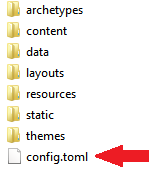
This error is thrown when you are trying to create a post from inside your content directory. Where there is no config.toml file, this is the file which is in the root directory of your Hugo website:
Keep Learning:
- How to set up Google Universal Analytics Property
- Add your website to Google Search
- How to extract string after space in Excel