SQL Left and Right joins
A SQL JOIN clause is used to combine rows from two or more tables, based on a related column between them. This is referred to as a key. In a relational database there would be a primary key and corresponding foreign key across all the tables which you are joining. Think of this like the tables personal identification.
There are four basic types of SQL joins:
- Inner Join
- Left Outer Join
- Right Outer Join
- Full Join
Today we will cover two of these joins: Left and Right, stay tuned for upcoming posts covering Inner and Full Join. The easiest and most intuitive way to explain the difference between these types of joins is by using a Venn diagram, which shows all possible logical relations between data sets.
Left Outer Join
LEFT (OUTER) JOIN will return all records from the left table with the corresponding matching records from the right table.
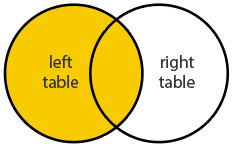
The general syntax to execute a SQL Left Outer Join is:
SELECT column_names
FROM first_table_name LEFT JOIN second_table_name
ON first_table_column_name = second_table_column_name
WHERE condition
Right Outer Join
RIGHT (OUTER) JOIN will return all records from the right table with all the correposnding matching records from the left table.
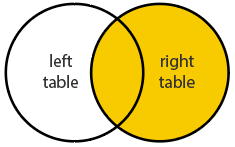
The general syntax to execute a SQL Right Outer Join is:
SELECT column_names
FROM first_table_name RIGHT JOIN second_table_name
ON first_table_column_name = second_table_column_name
WHERE condition
Applying Left and Right SQL Join Queries
Scared? Don’t run off just yet. Lets implement both SQL queries by breaking it down using the following Orders and Customer data sets as an example:
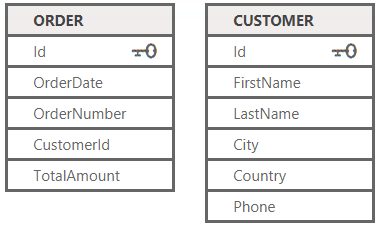
Firstly, the ORDER data set has five attributes and the column ‘Id’ is a unique identifier (UID). Before going further it is important to understand for database joins there must be a common unique identifier/s across all the data sets which are being joined.
Now that this has been established it can be observed from the CUSTOMER data set that it also has a corresponding ‘Id’ column. Perfect! Now we can proceed with joining our two data sets.
Using the LEFT JOIN syntax which we befriend earlier to perform a left join between the ORDER and CUSTOMER data set it is:
SELECT OrderNumber, TotalAmount, FirstName, LastName, City
FROM Customer C LEFT JOIN [Order] O
ON O.CustomerId = C.Id
WHERE TotalAmount is NULL
Similarly if you wanted to perfrom a SQL RIGHT JOIN on the same data sets it would be:
SELECT OrderNumber, TotalAmount, FirstName, LastName, City
FROM [Order] O RIGHT JOIN Customer C
ON O.CustomerId = C.Id
WHERE TotalAmount is NULL
Conclusion
Well that concludes this chapter on SQL Left and Right Joins. Wasn’t so scary after all. Right? These two SQL joins described will let you tie the different pieces of data together, and allow you to start asking and answering more challenging questions about it. Yet often it is ingesting the data into your database or a data warehouse and keeping it up-to-date which is the challenging task.
Note: The syntax for both SQL Left and Right Joins covered are the general structure for executing these queries. However, they’re not database agnostic which means the syntax could have minor adjustments dependening on the type of database system used (e.g. Oracle Database, MySQL and IBM DB2).